The transition from experimental AI art to professional design production has reached a critical tipping point. For years, creative directors and marketing professionals have struggled with AI outputs that look impressive at a glance but fail under technical scrutiny. The most common issues include garbled text, inconsistent lighting, and a lack of character depth.
These failures lead to extensive rework in traditional editing software. However, the emergence of higgsfield as a professional studio platform has changed the landscape. By integrating specialized models into a unified workflow, the platform ensures that the output is not just a draft, but a final asset.
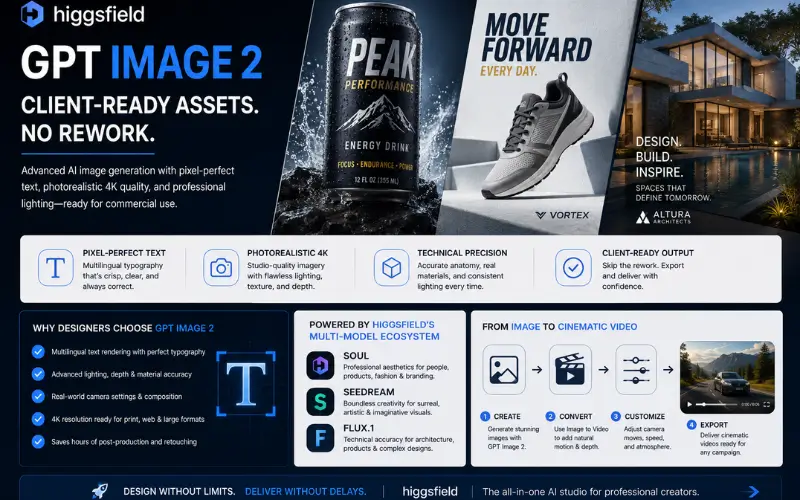
The specific integration of GPT Image 2 represents a massive leap forward for commercial graphic design. This technology allows users to bypass the traditional “fix it in post” mentality. Instead, it provides pixel-perfect text and photorealistic 4K imagery directly from the first generation.
The Evolution of Professional AI Image Generation
Most standard AI generators operate as standalone tools. They focus on broad artistic expression rather than the technical requirements of a commercial print job or a digital ad campaign. This is where higgsfield differentiates itself from the competition.
Instead of relying on a single generalist model, the platform provides access to a curated suite of specialized engines. This includes Higgsfield Soul for professional aesthetics, Seedream for highly creative endeavors, and Flux.1 for technical accuracy.
By unifying these tools, designers can select the exact architecture needed for a specific project. This precision is why GPT Image 2 has become the preferred choice for teams working on packaging and marketing content.
Technical Precision: Why Output Stays Final
The most significant drain on a designer’s time is correcting AI errors. These errors range from anatomical inaccuracies to lighting that defies the laws of physics. GPT Image 2 addresses these technical debt issues through advanced architectural training.
- Multilingual Typography: Most models treat text as a visual texture, leading to “gibberish” characters. This model treats typography as a semantic requirement.
- Dynamic Range Management: 4K outputs often suffer from “deep frying” or over-saturation. This tool maintains a professional color grade suitable for studio photography.
- Anatomical Correctness: Specialized layers ensure that human subjects have consistent proportions and realistic skin textures.
- Lighting Consistency: Shadows and highlights are calculated based on the 3D space of the prompt, ensuring the asset matches the intended environment.
Typography and Pixel-Perfect Text Rendering
One of the biggest hurdles in AI design has been text rendering. In the past, if a designer needed a poster for a “Summer Jazz Festival,” the AI might produce a beautiful background with text that reads “Smmr Jzz Fstvl.” This necessitates manual removal and re-typing in Photoshop.
According to research published by the MIT Technology Review on AI text rendering, the ability of a model to understand character placement is a hallmark of next-generation architecture. GPT Image 2 excels here by delivering “client-ready” text that requires zero touch-ups.
This capability extends beyond English. The system handles various languages and complex font styles while maintaining the integrity of the design. For designers working on digital product mockups or global marketing campaigns, this saves hours of tedious cloning and retouching.
Commercial Lighting and Compositional Accuracy
Professional assets must look like they were shot in a studio, not generated in a vacuum. Standard models often produce flat lighting that makes objects look “pasted” onto backgrounds. GPT Image 2 utilizes advanced depth maps to ensure global illumination.
- Studio Quality: The system replicates high-end photography setups like three-point lighting and softboxes.
- Material Science: Textures like glass, chrome, and silk reflect their surroundings with mathematical accuracy.
- Depth of Field: Real-world camera settings, such as f/1.8 aperture effects, are rendered naturally rather than through a blur filter.
Because of this level of detail, higgsfield users often find that their first generation is usable for high-traffic social media ads or internal corporate presentations. The need for masking and relighting is virtually eliminated.
Comparing Higgsfield Models: Soul, Seedream, and Flux.1
The power of the platform lies in its diversity. While GPT Image 2 handles the bulk of commercial graphic design tasks, it works in tandem with other top-tier models. This multi-model approach ensures that “one-size-fits-all” compromises never happen.
- Higgsfield Soul: This model is fine-tuned for professional aesthetics. It focuses on human subjects, fashion, and high-end editorial looks. It is the go-to for character consistency and “vibe-heavy” branding.
- Seedream: When the prompt requires extreme creativity and surrealism, Seedream takes the lead. It is designed to push the boundaries of what is visually possible while maintaining a high resolution.
- Flux.1: Known for its technical prowess, Flux.1 is often used for architectural renders and complex industrial designs where structural integrity is non-negotiable.
Having all these models in one place allows a creator to jump between styles without switching platforms. This ecosystem approach is why higgsfield is rapidly becoming the industry standard for AI-driven creative agencies.
From Static to Cinematic: The Video Conversion Workflow
Generating a perfect image is only half the battle in modern marketing. Most clients now demand motion assets alongside static images. The higgsfield platform was built with this transition in mind.
Once a professional asset is generated using GPT Image 2, it can be seamlessly pushed into the image-to-video workflow. This isn’t a simple “zoom” effect used by lower-end tools. It is a sophisticated cinematic conversion that respects the physics of the original image.
- Motion Consistency: The AI understands which elements should move (like hair or water) and which should remain static (like a product logo).
- Camera Control: Users can direct the camera path, allowing for pans, tilts, and dollies that look like professional cinematography.
- High Framerate: The video outputs avoid the “ghosting” artifacts common in earlier AI video models.
This workflow means a single prompt can produce a high-resolution billboard asset and a high-converting video ad in minutes. For a professional, this efficiency is the difference between winning a contract and losing it to a faster competitor.
Real-World Professional Use Cases
The application of GPT Image 2 spans across multiple industries. Its ability to produce final assets makes it invaluable for high-pressure environments.
- Commercial Graphic Design: Agencies use it to create posters and packaging that already feature the correct brand names and slogans.
- Digital Product Mockups: Instead of using generic stock photos, designers generate custom mockups that match the exact aesthetic of the brand.
- Studio Photography Software: Photographers use the platform to generate “plate” backgrounds for their subjects, ensuring perfect perspective and lighting.
- Character Consistency: Using the advanced features in higgsfield, writers and game developers can maintain the same character look across hundreds of different scenes.
In each of these scenarios, the goal is to reduce the “iteration loop.” By getting the asset right the first time, the creative team can focus on strategy and story rather than technical corrections.
Pros and Cons: A Transparent Evaluation
No tool is perfect, and a professional strategist must weigh the advantages against the learning curve. Here is an unbiased look at the current architecture.
Pros:
- Unparalleled text accuracy that handles complex phrasing and logos.
- Integration into a studio platform with video conversion capabilities.
- Access to multiple models (Soul, Seedream, Flux) in a single interface.
- Commercial-grade 4K output that meets print standards.
Cons:
- The high level of control requires a more detailed prompting style than “one-click” generators.
- The platform’s professional features may feel overwhelming to casual hobbyists.
- Advanced image-to-video features require a stable internet connection for high-resolution processing.
Despite the learning curve, the results speak for themselves. The time saved by avoiding rework far outweighs the time spent learning the platform’s professional controls.
The Final Verdict: Why Professionals are Switching
The era of “AI as a toy” is over. Professionals require tools that respect their time and meet the technical requirements of their clients. GPT Image 2 has proven itself to be more than just a generator; it is a production-ready solution.
By utilizing the unified ecosystem of higgsfield, creators gain access to a level of fidelity that was previously impossible. Whether it is the multilingual typography or the seamless path to cinematic video, the focus is always on the final output.
For those who are tired of spending hours in Photoshop fixing AI mistakes, the choice is clear. Moving your workflow to a platform designed for professional standards is the only way to stay competitive. GPT Image 2 is not just another model—it is the foundation of a modern, efficient, and rework-free creative studio.