Meta Business Suite is the free, centralized platform that lets businesses manage their Facebook Page, Instagram profile, ads, messages, and insights all from one dashboard. Whether you’re a solo entrepreneur or part of a marketing team, it replaces the need to jump between separate apps for social media management, giving you a single hub to plan, publish, and analyze content across Meta’s platforms.
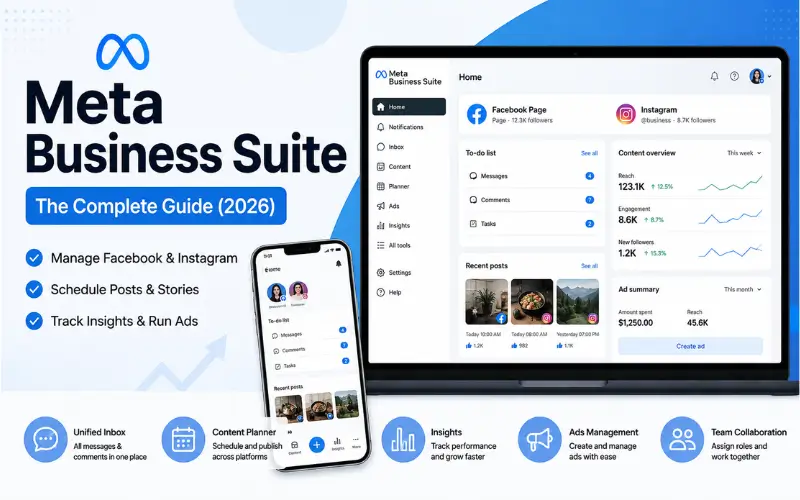
This guide breaks down what Meta Business Suite includes, how to set it up correctly, and how to use its core features to run a more efficient social media strategy in 2026.
What Is Meta Business Suite?
Meta Business Suite is Meta’s all-in-one management tool for businesses that connects your Facebook Page and Instagram account into a single workspace. It’s accessible both as a web dashboard and as a mobile app, and it’s completely free to use.
Quick definition: Meta Business Suite is a unified dashboard that allows businesses to publish posts, respond to messages and comments, run ads, and view performance insights across Facebook and Instagram without switching between apps.
It effectively replaced the older, more limited Business Manager interface for day-to-day content and engagement tasks, while Business Manager (now often called Meta Business Manager) remains the backend layer for managing ad accounts, billing, and team permissions.
Key Features of Meta Business Suite
Meta Business Suite is organized around a few core functions that cover most daily social media management needs:
- Unified inbox — manage Facebook Messenger, Instagram DMs, and comments in one place
- Content planner — schedule and publish posts and stories across both platforms
- Insights dashboard — track reach, engagement, and follower growth
- Ads management — create and monitor ad campaigns directly from the same interface
- Automated responses — set up instant replies and away messages
- Team collaboration — assign roles and permissions to multiple team members
Unified Inbox
The unified inbox consolidates every conversation — Messenger, Instagram, and comment replies — into a single feed. This is one of the most valued features for small businesses that previously had to monitor two separate apps for customer messaging.
Content Planner & Scheduling
The built-in content calendar allows you to draft, schedule, and preview posts for both Facebook and Instagram simultaneously. You can also create identical or platform-customized captions for each channel from the same screen, saving significant time compared to manual cross-platform posting.
How to Set Up Meta Business Suite
Getting started takes just a few steps:
- Go to business.facebook.com or download the Meta Business Suite mobile app.
- Log in with the Facebook account connected to your business Page.
- Connect your Facebook Page if it isn’t already linked.
- Connect your Instagram business account to enable cross-platform management.
- Set up your notification preferences and assign team member roles if needed.
- Explore the Insights tab to review your current performance baseline.
Featured Answer: To use Meta Business Suite, you need an existing Facebook Page — a personal profile alone isn’t sufficient, since the tool is built specifically around business Page management.
Meta Business Suite vs. Meta Business Manager
A common point of confusion is the difference between these two tools:
| Feature | Meta Business Suite | Meta Business Manager |
| Primary use | Daily content, messaging, insights | Ad account & asset administration |
| Best for | Small business owners, social managers | Agencies, larger advertisers |
| Ad account setup | Limited | Full control |
| Team permissions | Basic roles | Granular, asset-level permissions |
| Billing management | Not available | Available |
In short: Meta Business Suite is where you run day-to-day operations, while Meta Business Manager is where you configure the underlying business infrastructure — ad accounts, payment methods, and detailed user permissions.
Using Insights to Track Performance
The Insights tab inside Meta Business Suite provides key performance metrics without needing a separate analytics tool:
- Reach and impressions by post and by platform
- Engagement rate (likes, comments, shares, saves)
- Follower growth trends over time
- Best posting times based on audience activity
- Ad performance summaries when campaigns are active
Reviewing these metrics weekly helps identify which content formats — reels, images, or carousels — are driving the most engagement, allowing you to adjust your content strategy accordingly.
Running Ads Through Meta Business Suite
While full campaign builds are still often done in Ads Manager, Meta Business Suite allows for quick boosted posts and simplified ad creation directly from the content you’ve already published. This is especially useful for:
- Promoting a high-performing organic post
- Running quick local awareness or engagement campaigns
- Testing creative before committing budget through the full Ads Manager interface
Common Mistakes Businesses Make
- Not connecting Instagram properly, which limits cross-platform scheduling and insights.
- Ignoring the unified inbox, leading to slow response times and missed leads.
- Ad-hoc posting instead of using the planner, resulting in inconsistent publishing schedules.
- Skipping the Insights tab, missing early signals about what content resonates with the audience.
- Assigning excessive permissions to team members instead of using role-based access.
Best Practices for 2026
- Set a weekly content batch session using the planner to stay consistent.
- Respond to messages within the unified inbox promptly — response time directly affects customer engagement scores.
- Review Insights every week, not just monthly, to catch trends early.
- Use Meta Business Manager alongside the Suite for any team larger than one or two people, to keep permissions and billing organized.
- Regularly audit connected Pages and accounts to remove unused or outdated assets.
Final Thoughts
Meta Business Suite remains the most practical starting point for businesses managing their presence across Facebook and Instagram in 2026. By combining messaging, scheduling, insights, and lightweight ad tools into one dashboard, it removes much of the friction from daily social media management — making it easier for teams of any size to stay consistent, responsive, and data-informed.